Categories are a built‑in feature of MediaWiki that help keep content organized. Each category automatically has its own index page. When you add a category tag to a page, you create a link to the category page. Clicking the link takes you to a list of all pages in the same category, making it easy to discover related content.
How do I use categories?
Alongside namespaces, categories play an important role in organizing content in the wiki. They group related pages together and automatically link them to corresponding category pages. Most categories are created by users, but in some cases MediaWiki assigns categories automatically—for example, to mark pages with broken links.
Features
- Category tree: Categories can be organized as subcategories of main categories.
- Tagging: Categories can be used to spontaneously "tag" pages.
- Category manager: Categories can be systematically created and used by all users via the category manager.
- Multiple categories per page: A page can be assigned to several categories.
- Independent of namespaces: Categories are available throughout the wiki and cannot be limited to individual namespaces.
- Page queries: Categories are useful for extensions like Smartlist or Semantic Mediawiki as they are available as query arguments.
Assigning categories to a page
- In the Supplementary area at the end of the page
- From the options menu of VisualEditor (Visual Editing)
- Via manual input as wikitext (source code editing)
- Using the link Page tools > ...all actions > Insert category
-
 Supplemental area
 -
 Visual editor
 -
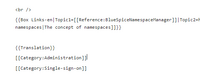 Wikitext
 -
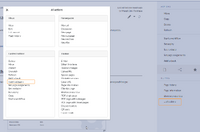 Link "...all actions"


In the supplementary area at the bottom of the page
The supplement area contains a field for category assignment. Any user with edit rights can click the edit link to add or remove categories from the page. To view all existing categories with subcategories, you can click on the tree icon. Once done, the categories will be confirmed with the tick.
The display of the page categories can be moved to the title area in the Config manager.
In the visual editor (VisualEditor)
In the page options menu of VisualEditor there is a menu item Categories. Here you can update category assignments to the page in edit mode, as well as add a sort key to the category.

In wikitext
Open an article that you want to assign to a category in edit mode. Now enter the following anywhere in the wiki code (usually at the end of the page though):
[[Category:Production]]
or
[[Category:Production]]
It is true that:
- categories can be created in any number and by any user. So before you just get started, it's always best to check which categories already exist to avoid unnecessary duplication of similar categories.
- a page can be assigned to several categories.
- the place in the source code where the category link is inserted is technically irrelevant. However, the convention is to include categories at the end of an article.
Links to category pages
For links directly to a category page, a colon is required before the namespace.
Example: [[:Category: new_page]]
If the colon is missing, the link will not be created, but the page will be tagged with the category instead.
Category pages
When users click a category link, the Category:<Category_Name> page loads. All pages and media that are assigned to a specific category are automatically listed there.
If you click on a category page that has not yet been created - linked in red - you have the option of creating the category page.
Show all category pages
On the special page Special:Categories you can view a list of all existing categories in the wiki. Click on a category to go to the corresponding category page. If a page in the listing has a red background, the category is in use in the wiki, but the associated category page has not yet been created.
Which pages can be categorized?
Whether a page can be categorized depends on its content model. Generally, all pages in content namespaces can be categorized because they have the page content model wikitext.
A page's content model can be determined via the page tools > Page information > General. Starting with BlueSpice v5.1.7+, it is possible to tag pages that have additional page content models:
- book
- FormDefinition (Extension:Forms)
- BPMN (Extension:CognitiveProcessDesigner)
- css
- javascript
- json
- mail_template
- pdfcreator_template (Extension:PDFCreator)
Category manager
The easiest way to manage categories and subcategories is through the Special:Category manager page. The Category manager can be reached via the menu item Global Actions > Editing > Categories.
Category management allows you to create a tree structure. You should therefore think about meaningful main and subcategories. In order to be able to follow the category tree, it is recommended to start with a root category (e.g. 1-Wiki).
If a category is renamed via the category management, the category name is also renamed on all pages that use this category.



